
Most outbound teams treat copywriting as a one-off task. Someone writes a template, pastes it into a campaign, and moves on. The next campaign starts from scratch. The one after that does too. Over time, you end up with copy scattered across spreadsheets, inconsistent quality across campaigns, and no clear way to know what’s actually working.
There’s a better way to approach this. Cold email copywriting becomes far more powerful when it’s treated as a system rather than a series of individual tasks. When you centralize your copy logic, prompts, and campaign context, you can launch faster, maintain quality at scale, and make improvements that ripple across every campaign you run. If you haven’t nailed down the fundamentals of what makes a single message work yet, it’s worth reading how to write a cold email that earns a reply first — this article assumes that foundation and focuses on how to scale it.
This article walks through the architecture behind a professional outbound copy system, covering how to store and version your prompts, how to tailor messaging for different campaign types, and how to connect your copy logic directly to your enrichment workflow.
Why One-Off Templates Are Holding You Back
The typical cold outreach setup looks like this: a template lives inside a sending tool, variables are swapped in manually, and the whole thing is rebuilt whenever a new campaign starts. It works well enough at small scale. But as soon as you’re running multiple campaigns simultaneously, the cracks start to show.
Inconsistency is the first problem. When each campaign has its own isolated copy, the quality depends entirely on whoever wrote it that week. There’s no shared standard, no reuse of what’s already working, and no easy way to apply lessons from one campaign to another.
Speed is the second problem. Starting from scratch every time is slow. A proper outbound copy system should let you launch a new campaign in hours, not days.
Quality control is the third. When copy logic is spread across dozens of tables and tools, reviewing and improving it becomes a full-time job on its own.
The fix is centralization. Build one place where your copy logic lives, and let every campaign pull from it.
The Architecture: Prompts, Context, and Version Control
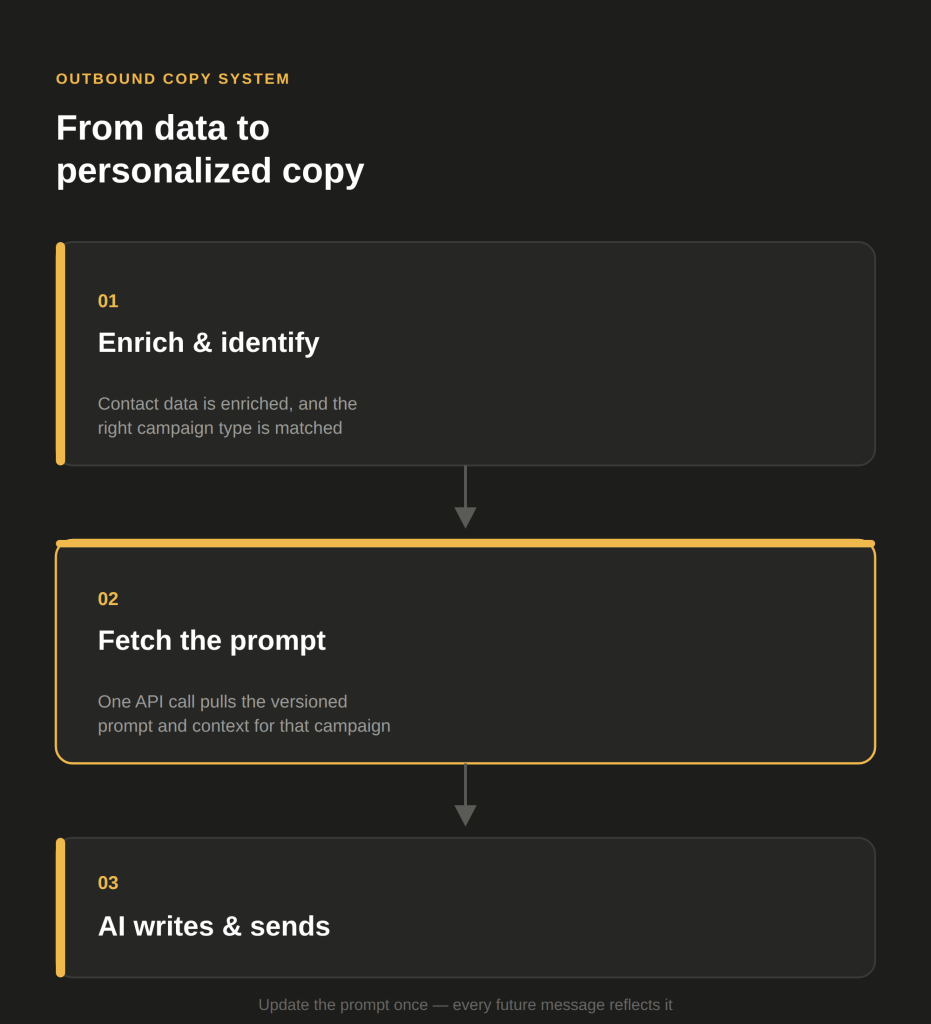
The foundation of a scalable outbound copy system is separating three things that most teams keep tangled together: the prompt, the campaign context, and the contact data.
Here’s how to think about each layer:
- The prompt is the instruction set that tells your AI how to write the message. It defines the structure, tone, length, and goal of the copy.
- The campaign context is the positioning and framing specific to that campaign. It might include the trigger you’re responding to, the value proposition you’re leading with, and the pain point you’re addressing.
- The contact data is what makes the message feel personal. It comes from your enrichment tool and gets injected dynamically at the point of generation. This is the same idea behind treating your ICP as a live data feed of Clay signals rather than a static PDF — the copy system works best when the data feeding it is just as dynamic as the prompts themselves.
Storing prompts and context in a version-controlled system like GitHub is one of the most practical moves you can make here. Each campaign gets its own folder containing the prompt file and the context package. When a campaign needs updating, you update the file in one place. Every message generated from that campaign automatically reflects the change.
This approach means your copy logic isn’t buried inside a Clay table or hardcoded into a sending sequence. It lives in a structured, auditable location that your whole team can access and improve over time.
To connect it to your outreach workflow, you set up an API call from your enrichment table (in Clay, for example) to your GitHub repository. The table fetches the correct prompt and context for the campaign, combines it with enriched contact data, and generates a personalized message on the fly. One prompt, applied consistently, across thousands of contacts.
Different Campaign Types Need Different Copy Frameworks
Centralization doesn’t mean using one generic template for everything. The whole point is that each campaign gets its own carefully crafted prompt and context package, pulled from your central system when needed.
Three campaign types that illustrate this well:
Trade Show Outreach
When you’re reaching out to exhibitors or attendees of a specific event, the trigger is the event itself. Your copy should acknowledge that context immediately. The messaging framework here leans on shared industry presence and timeliness. You’re not cold, you’re contextually relevant. The prompt for this campaign should instruct the AI to reference the event, lead with the relevance of timing, and keep the ask light. We cover exactly how to source and structure this kind of campaign in how to use event registrant data as a cold outreach signal, including where to pull attendee lists and how to build the enrichment step that feeds this prompt.
LinkedIn Signal Campaigns
These campaigns target people who have engaged with relevant content on LinkedIn, whether by posting about a specific topic or engaging with posts in your space. The trigger is behavioral. Your copy should reflect that you’ve noticed something specific about how they’re thinking or what they’re focused on. The context package for this campaign needs to include the keyword categories you’re monitoring and the problem space they signal. This is a direct application of signal-based outreach for personalizing cold email at scale — the prompt package is just the mechanism that turns a detected signal into consistent, ready-to-send copy.
New Hire Trigger Campaigns
When a company makes a relevant hire, it often signals a change in priorities or a gap they’re trying to fill. Reaching out to new hires or to the companies making those hires requires copy that acknowledges the transition and leads with how you help during moments of change. The prompt here should be built around timing and relevance to the hiring signal. If this campaign type is new to you, people-first vs. company-first prospecting breaks down how to actually build the Clay workflow that surfaces these new-hire signals before you get to the copy stage at all.
Each of these campaigns has a different angle, a different emotional hook, and a different reason for the contact to care. By storing those frameworks separately in your version-controlled system, you can launch any of them cleanly without reinventing the wheel.
How to Connect Copy Generation to Your Enrichment Workflow
The most powerful part of this system is the API connection between your prompt library and your enrichment tool. This is what turns static templates into dynamic, contact-specific copy.
Here’s the basic flow:
- Contacts are enriched in your data table with relevant firmographic and signal data.
- The campaign is identified, which determines which prompt and context package to use.
- An API call fetches the prompt and context from your version-controlled repository.
- The AI generates the message using the prompt, the context, and the contact-specific data as inputs.
- The output is written back into the table, ready for review and sending.
This architecture means copy is generated dynamically rather than manually written for each contact. It also means the copy quality is tied to your prompt quality, not to whoever had time to write emails that day.
A few practical notes on making this work well:
- Keep prompts specific. Vague prompts produce vague copy. Each prompt should define the structure of the message, the tone, the length, and the primary goal.
- Include examples in your context packages. Showing the AI what good looks like for a given campaign dramatically improves output consistency.
- Build in a review step. Even with a strong system, spot-checking output before it goes live is worth the few minutes it takes.
FAQ
An outbound copy system is a structured approach to generating and managing cold outreach messages across multiple campaigns. Rather than writing templates one by one, you store your copy logic centrally so it can be reused and improved over time. This reduces inconsistency and speeds up campaign launches significantly.
It depends on the provider and the context. Outsourcing tends to outperform in-house hiring when outbound is not yet validated, when speed to pipeline matters, and when the company lacks the infrastructure to manage an SDR properly. In highly specialised industries where deep domain knowledge is essential, in-house eventually becomes the stronger long-term model.
AI copywriting tools can generate high-quality, personalized outreach at scale, but they work best when guided by well-crafted prompts and clear campaign context written by a human. Think of AI as a production layer that multiplies the work of a skilled copywriter rather than replacing the thinking behind the copy. Our look at AI copywriting for cold outreach: real results vs. hype covers where the realistic gains actually show up, and where the hype outruns the results.
A full-service outbound team typically uses a combination of prospecting databases, data enrichment tools, sequencing platforms, LinkedIn automation tools, and deliverability infrastructure. Setting this stack up and maintaining it internally requires significant time and ongoing investment. Our own cold email outreach service is built on exactly this kind of pre-assembled, pre-optimised stack.
You can start with just one or two well-built campaign types and expand from there. The goal is to build the architecture correctly from the beginning so that adding new campaigns is fast and consistent. Start with your highest-volume campaign type and use it to pressure-test the system before scaling.
Conclusion
A scalable outbound copy system is not about writing more templates. It’s about building architecture that lets good copywriting logic work harder and go further. By centralizing your prompts and campaign context in a version-controlled repository, connecting it to your enrichment workflow via API, and building distinct frameworks for each campaign type, you create a system where quality is consistent, launches are fast, and improvements compound over time.
If your cold email copywriting currently lives in scattered tables and one-off templates, now is the right time to rebuild it as a proper system. The investment pays off quickly, especially as your campaign volume grows.
Want help building a copy system that scales? Outbound Republic designs and runs AI-powered outbound engines for B2B companies that want predictable pipeline without the overhead. Get in touch to see how it works.