

Most outbound lists start with firmographics: industry, size, location, job title. They tell you who could buy. They don’t tell you who already believes they have the problem and has spent money on it.
Your competitors’ customers do. They have admitted the problem exists, they have a budget line for it, and they understand the category. For many B2B companies, that makes them the best list to build after the obvious one.
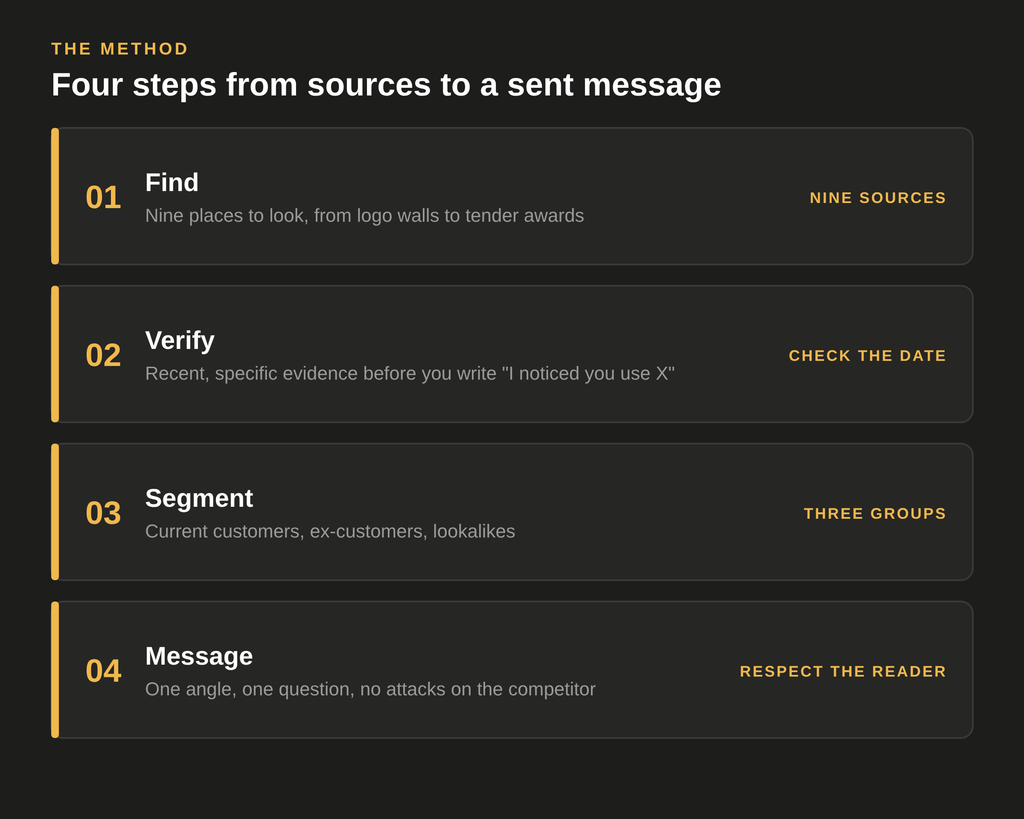
Finding them is the easy half. The harder half is knowing whether someone really is a customer, working out why they might switch, and writing a message that doesn’t read like surveillance. This guide covers the full method in four steps: find, verify, segment, message.
Everything here relies on publicly available information. Where there are legal or reputational limits, we say so.
Why competitor customers make a strong list
- The problem is proven. A company that bought a competing product has already decided the problem is worth solving. You skip the “do we need this at all?” conversation.
- The category is understood. You spend less time educating and more time explaining why your approach is different.
- Budget exists. There is already a line item, which is easier to redirect than to create.
- Timing signals are often public. Renewals, price changes, leadership changes and public complaints can all show up in the open.
There are honest downsides too:
- Some of them are happy and locked in by contracts, integrations or switching costs.
- Some are in the middle of a rollout and won’t look at anything new.
- A competitor’s customer list is only a good list if you can tell which of them are worth contacting. That is what the verify and segment steps are for.
Step 1: Find them (nine places to look)
1. The competitor’s own website
Start here, because most companies publish their best customers themselves.
- Logo walls on the homepage and pricing page.
- Case studies and customer stories.
- Testimonials and quotes with names and job titles.
- Press releases and partnership announcements.
- Webinars and videos where customers speak.
What you get: company names and often the use case and the sponsor’s job title.
Limitation: the logos are chosen by the competitor, and they go out of date. A case study from several years ago says little about today.
2. Review sites
Software review platforms such as G2 and Capterra, and general ones such as Trustpilot, show who uses a product and what they think of it.
- Read the reviews for the company size, industry and job title of the reviewer.
- Sort by the lowest ratings to find frustrated users.
- Look at what the reviews say they are missing. That becomes your message angle later.
What you get: a mix of current customers and unhappy ones, with a reason for dissatisfaction attached.
Limitation: many reviewers are anonymized, so you often get a company profile rather than a name. Use it as a pattern for what to look for elsewhere.
3. Technology detection tools
For products that leave a footprint on a website, such as chat widgets, analytics, forms or e-commerce platforms, tools like BuiltWith and Wappalyzer can show which sites use a given technology.
What you get: lists of websites that use a competitor’s tool, often with company data.
Limitation: it only works for tools that are visible from the outside. A back-office system that never touches a website won’t appear.
4. LinkedIn
LinkedIn is a rich source if you stay within what the platform allows.
- People and companies who engage with the competitor’s posts.
- Employees who list the competitor’s product in their skills or job descriptions.
- Posts where someone announces they are “excited to start using” a product.
- Recommendations and endorsements mentioning the vendor.
What you get: names of real people, often at the decision-making or user level.
Limitation: LinkedIn limits automated scraping and can restrict accounts that do it. Collect carefully and review the platform’s rules before you build anything automated.
5. Job postings
When a company hires for a role, it often writes down the tools it uses.
- Search for “experience with [competitor’s product]” in job boards and company career pages.
- Look at requirements in postings for operations, sales ops, marketing ops and IT roles.
What you get: an up-to-date signal that a company uses the product now, which is usually fresher than a logo on a website.
Limitation: it covers roles that exist at that moment, so it only catches a share of customers.
6. Trust centers and sub-processor lists
Some companies publish a trust page or a list of the vendors that process data on their behalf, partly because data protection rules encourage transparency. Where they do, a competitor’s name may appear in the list.
What you get: a very reliable signal that the company uses the vendor.
Limitation: only some companies publish this, and mostly those that sell to other businesses in regulated areas. Treat it as a bonus source, not a main one.
7. Events and communities
- Exhibitor and sponsor lists at industry events.
- Speaker lineups where customers present case studies.
- Public Slack or Discord communities, Reddit threads and forums where people discuss tools.
- If you run your own events, event registrant data is a separate signal worth using.
What you get: context and honest opinions, plus names of companies that are active in the category.
Limitation: do not scrape attendee or member lists, and do not use contact details taken from a community that people joined for a different purpose.
8. Public procurement and tender awards
If your competitor sells to public institutions, universities or municipalities, award notices are some of the most reliable sources there is.
- Public procurement registers show who won the contract, for how long, and often for how much.
- Contract end dates tell you when the next tender is likely to happen.
What you get: confirmed customers with dates, which is rare in any other source.
Limitation: the process is slow and formal, so a message needs to refer to how the institution actually buys.
9. Search operators
A few well-built searches can find pages that mention the competitor in a customer context.
"powered by [competitor]"or"we use [competitor]"."[competitor] alternative"and"switching from [competitor]"to find people comparing options."integrates with [competitor]"to find partners and adjacent customers.site:linkedin.com "[competitor]"combined with a job title.
What you get: scattered but often high-intent mentions.
Limitation: it takes manual effort and gives uneven coverage.
Which source for which competitor
| Source | Effort | Reliability | Best for |
|---|---|---|---|
| Competitor’s website | Low | Medium (can be outdated) | Any competitor with public case studies |
| Review sites | Low | Medium | Software and tools |
| Technology detection | Medium | High (for visible tech) | Website-based tools |
| Medium | Medium | People-level targeting | |
| Job postings | Medium | High (current) | Tools that need specialists |
| Trust centers | Medium | High | SaaS and regulated sectors |
| Events and communities | Medium | Low to medium | Niche categories |
| Procurement records | High | Very high | Public sector competitors |
| Search operators | Medium | Medium | Any competitor |
Step 2: Verify before you write
A logo on a website is not proof that someone is a customer today. Companies keep logos for years, and customers leave without announcing it.
Before you write “I noticed you use X”, check at least one of these:
- Date: how old is the case study, testimonial or announcement?
- Recency: is there a recent job posting, review or post that mentions the product?
- Technical evidence: does a detection tool show the product on the company’s site right now?
- Contract evidence: for public buyers, does the award notice cover the current period?
Then tag each lead by confidence:
- Confirmed: you have recent, specific evidence.
- Probable: the evidence is real but older, or indirect.
- Unverified: the company is simply similar to the competitor’s customers.
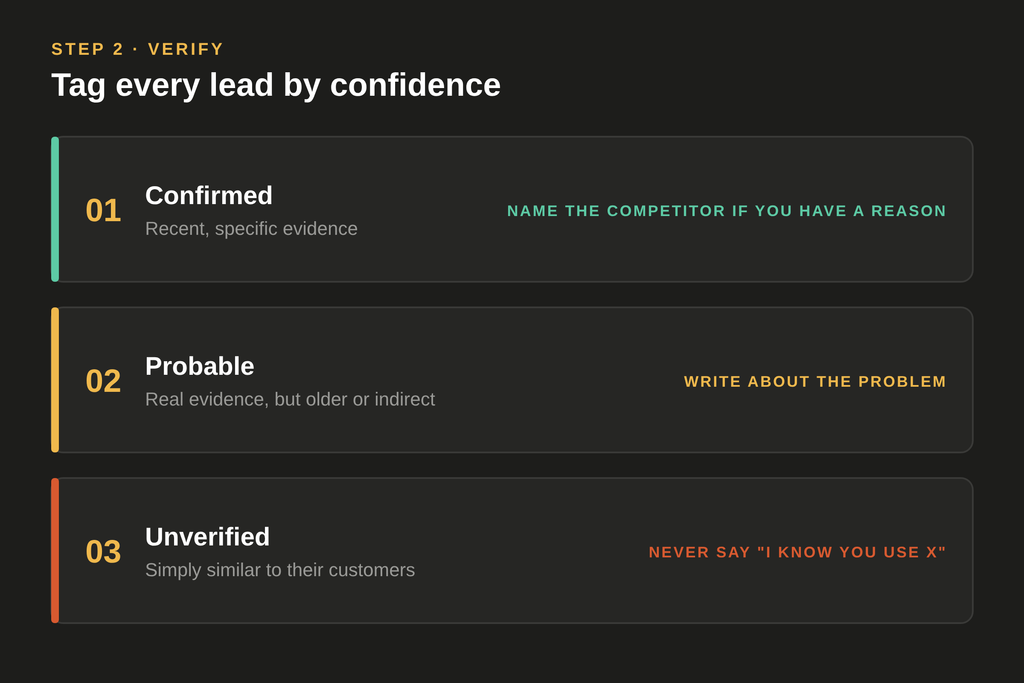
Use messages that refer to the competitor only for confirmed leads. For the rest, write about the problem, not about their current vendor. This also keeps your list in good shape in a workflow built in a tool like Clay, where each source can become a column with a confidence tag., and for the segmentation side of that build, see Clay and ICP precision.
Step 3: Segment the list
Not all competitor-related leads are the same, and they shouldn’t get the same message.
| Segment | Who they are | Typical situation | Approach |
|---|---|---|---|
| Current customers | Confirmed users of the competitor | Might be happy or stuck | Gap or complement message |
| Ex-customers and unhappy users | Logo removed, complaints in reviews, leadership change | Open to alternatives | Direct, problem-focused message |
| Lookalikes | Companies similar to the competitor’s customers, with no confirmed vendor | Same problem, no clear solution | Category message without naming anyone |
In practice:
- Ex-customers and unhappy users are the highest-intent group, but also the smallest one.
- Lookalikes are usually the largest group and the safest one, because you don’t need to say anything about the competitor.
- Current customers need the most care. Without a reason to switch, a message is easy to ignore.
To decide who to contact first, multiply two things: how confident you are about the evidence, and whether there is a visible reason for the company to change now (renewal window, public complaint, new leadership, new budget).
Step 4: Write the message
Contacting a competitor’s customer is not awkward by itself. It becomes awkward when the message makes the reader feel watched, or when it attacks a product they chose.
Rules that keep it professional
- Don’t criticize the competitor by name. The reader may have chosen it, and you look defensive.
- Don’t claim knowledge you can’t support. “I saw you use X” is fine when verified. Guessing is not.
- Lead with the reader’s situation, not with the competitor’s weakness.
- Don’t reveal how you found them if it would sound invasive. “I noticed your team is hiring for a role that works with X” is fine. A long list of everything you found is not.
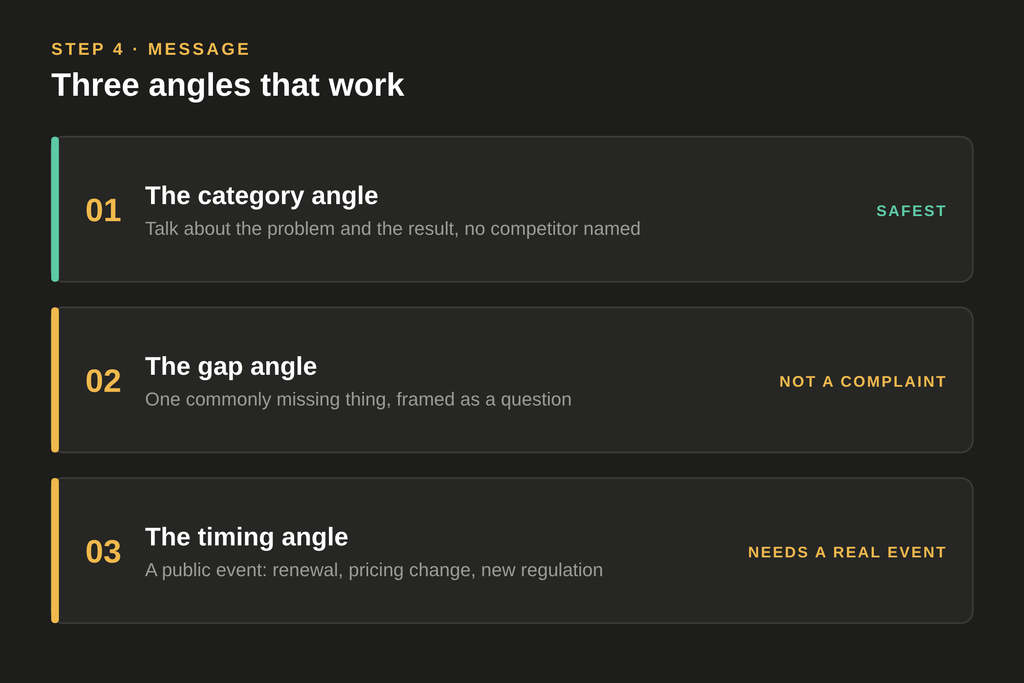
Three angles that work
1. The category angle (no competitor mentioned) Talk about the problem and the result. This is the safest option and suits lookalikes and unverified leads.
Subject: Reporting at [Company] Hi [Name], teams in [industry] that have been running [category] for a while usually hit the same wall: [specific limitation]. We help them [specific result]. Worth a short conversation about how you handle it today?
2. The gap angle Use one specific thing that buyers of this category commonly find missing. Frame it as a question, not as a complaint about a vendor.
Hi [Name], one thing we hear often from teams using [category] tools: [specific gap]. Is that something you’ve run into at [Company]?
3. The timing angle Use a public event: a contract that is coming up for renewal, a published pricing change, a new regulation, a leadership change.
Hi [Name], I saw that [public event]. When that happens, teams often review [process]. If it’s on your list, I can share how others approached it.
This is signal-based outreach in practice. We go deeper in signal-based outreach: how to personalize cold emails at scale.
A simple sequence
| Step | Channel | Purpose |
|---|---|---|
| 1 | Short message with one angle and one question | |
| 2 | LinkedIn connection | No pitch, a simple note that refers to their role |
| 3 | Email (a few days later) | A second angle or a useful resource |
| 4 | Email or LinkedIn | A brief closing message |
Adapt the number of steps and delays to your audience and sending setup. For help with the structure of the flow, see how to write a cold email that earns a reply. For combining email with LinkedIn, see multi-channel vs. single-channel outbound.
Compliance and reputation
- Data protection: in the EU, B2B outreach usually relies on legitimate interest, which requires a documented assessment and a defensible source of data. Using a competitor’s public customer page is easier to defend than a purchased list, but you still need to explain how you got the contact details and offer a clear way to opt out. See our GDPR and cold email guide.
- Confidential information: never use information that came from an NDA, a former employer or a private document, even if someone sends it to you.
- Platform rules: respect the terms of the platforms you collect data from.
- Reputation: your messages can be forwarded to the competitor. Write every message as if they will read it.
This is general information, not legal advice. Check your own situation with a lawyer, especially if you operate in several countries.
How to measure whether it works
Compare competitor-based lists against your standard ICP list, using the same offer and similar volume.
- Track positive replies, not only total replies. A high reply rate with few real conversations is not a win. For more on this distinction see seven outbound metrics that actually matter.
- Split results by segment: current customers, ex-customers, lookalikes.
- Track how many meetings come from each confidence level, to see whether verification is worth the effort.
- Review the replies themselves. Competitor-related objections (“we’re happy with what we have”) show you which angle to change.
Don’t expect the same results across markets. How well this works depends on the category, how locked in customers are and how well your message fits.
Common mistakes
- Sending “I know you use X” to unverified leads. One wrong guess damages credibility.
- Attacking the competitor. It makes the message about them, not about the reader.
- Treating the whole list as one segment. An unhappy ex-customer and a happy locked-in customer need different messages.
- Relying on one source. Logos alone give a skewed and outdated picture.
- Ignoring the lookalike group. It is often the largest and easiest part of the opportunity.
- Skipping the legal check. It’s cheaper to set it up properly once than to deal with complaints later.
FAQ
In general, yes, if you use publicly available business information, have a lawful basis for the contact (in the EU usually legitimate interest), offer a clear opt-out and don’t use confidential information or break any contract you are bound by. The details depend on your country and situation, so check with a lawyer.
Combine several sources: the competitor’s customer pages, review sites, technology detection tools, job postings and LinkedIn. Verify each lead with a second source before you treat it as a confirmed customer.
Only when the lead is confirmed and you have a clear reason. In most cases it works better to write about the problem and the result without naming anyone.
Read low-rated reviews, look for public complaints and comparison searches such as “alternative to [competitor]”, and watch for signs like a removed logo or a leadership change at the customer.
Yes, but the sources differ. For services, case studies, events, LinkedIn posts and public procurement records matter more than technology detection tools.
Summary
Finding a competitor’s customers is not about trickery. It is a research task with four steps: find the sources, verify the evidence, segment by situation and write a message that respects the reader. Do that, and you have a list of companies that already believe the problem is worth solving.
If you’d like help building a list like this for your market, and a sequence to go with it, see our cold email outreach service or talk to us.