

Clay demos make outbound look like ten minutes of drag and drop. Then you open an empty table, and the real questions start: what do I build first, what does it cost, and how do I know the output is good enough to send?
This guide is for teams that have no data engineer and no one who enjoys spreadsheets for a living. It walks through the smallest Clay setup that takes you from an ICP to a verified, personalized, ready-to-send lead. It does not cover advanced formulas or custom API work, because you do not need them for a first campaign.
Every step ends with a checkpoint. If you cannot tick it, do not move on.
Before you open Clay: three decisions
Most Clay problems start before the first table exists. Settle these first.
1. Define who you are looking for
- Write the ICP in one paragraph: industry, company size, geography, buyer title
- List 3 to 5 signals that make an account worth contacting now (a relevant job posting, a technology they use, a recent funding round, a new market)
- If this is still fuzzy, fix it first. Clay will enrich a vague ICP faster, not better. Our guide on building an ICP when you have almost no customers is a good starting point.
2. Name an owner and a reviewer
- One person owns the table and its logic
- One person, ideally whoever sends the outreach, reviews the output
- If you cannot name both, the setup will stall within weeks. We cover why at the end of this guide.
3. Set a test budget
- Clay actions consume credits, and some enrichments cost far more than others
- Decide how many credits you will spend on the first test run before you run anything
- Start with a few hundred rows, never the full list
Checkpoint: a one-paragraph ICP, a list of signals, two named people and a credit budget.
The stack on one page
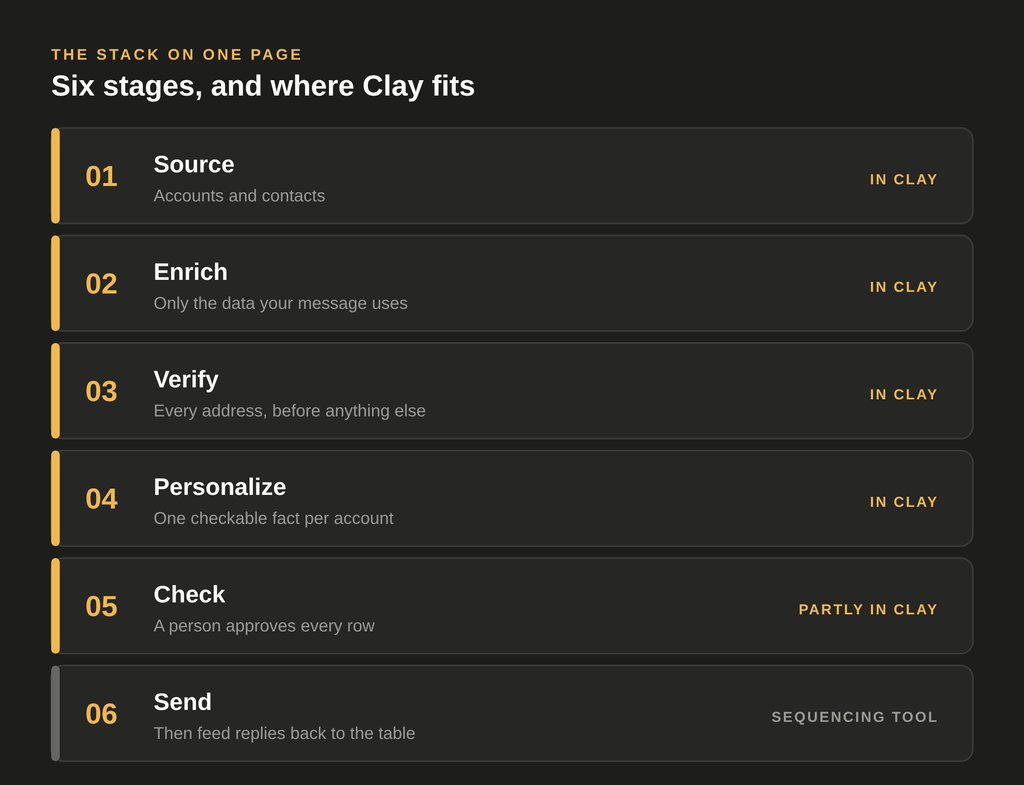
Before building, it helps to see where Clay sits. A basic outbound pipeline has six stages:
- Source the accounts and contacts
- Enrich them with the data your messaging needs
- Verify the email addresses
- Personalize the first line or the key message
- Check the output before it goes out
- Send and feed replies back
Clay can handle the first four stages and part of the fifth. Sending usually happens in a separate sequencing tool, and LinkedIn outreach in a separate automation tool. We name tools below as examples only, and any comparable option works. For a wider view of what a team really needs, see building an outbound tech stack.
Step 1: Build a small list
- Start with 200 to 500 rows, enough to test the logic and cheap enough to throw away
- Use whichever source fits: Clay’s own company and people search, a CSV import, or a list from another tool
- Keep only the columns you need: company name, domain, contact name, title, LinkedIn URL
- If your segments are still loose, Clay and ICP precision shows how to tighten them
Why small: every mistake in the table logic repeats on every row. Finding a bad rule on 300 rows costs little. Finding it on 30,000 costs real money.
Checkpoint: every row has a company, a domain and a contact title, and you have removed obvious mismatches by hand.
Step 2: Enrich in a sensible order
Enrichment is where budgets disappear, so order matters.
Run cheap filters first
- Remove rows that clearly fail your ICP (wrong country, wrong size, wrong industry) before spending anything on them
- Every row you remove early is a row you never pay to enrich
Then add only the data your message uses
- If your email will mention a technology, add one technology column
- If it will mention hiring, add one hiring signal
- Skip “nice to have” columns. Each one costs credits and makes the table harder to maintain
Use a waterfall for emails and phone numbers
- A waterfall asks one data provider for the email, and only if that fails, asks the next one
- This usually raises coverage compared with a single provider, but each additional step can cost more
- Put cheaper providers first and order the rest deliberately, instead of copying a template unchanged
Checkpoint: estimate the cost per row before running the full table, and run a 20-row sample first to confirm the number.
Step 3: Verify emails before anything else touches them
Enriched emails are not verified emails. Verification sits between enrichment and sending, every time.
- Run each address through a verification step and store the result in its own column
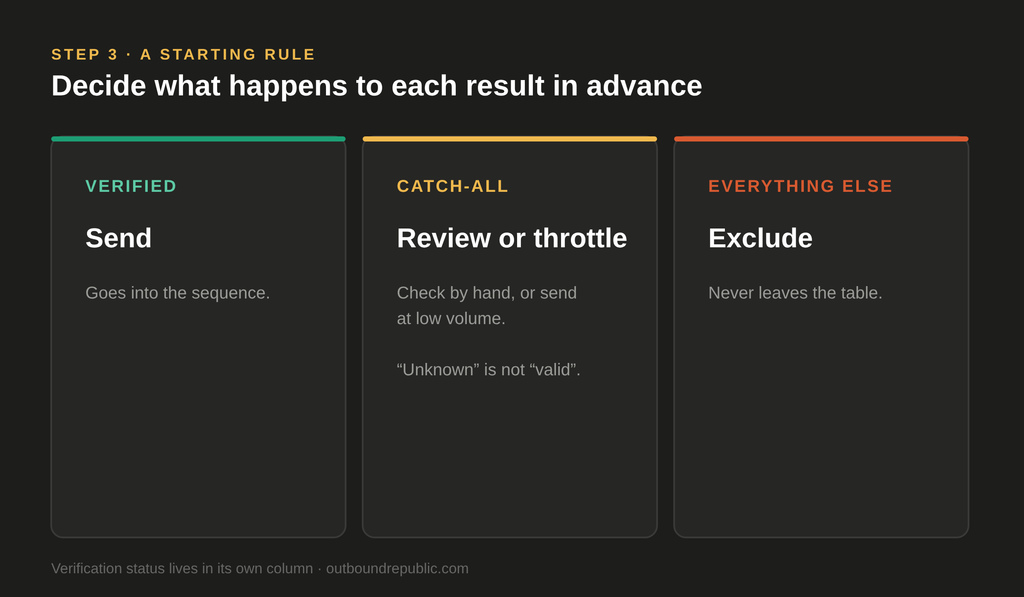
- Decide your rule for uncertain results in advance. Catch-all domains are common in B2B, and “unknown” is not “valid”
- A simple starting rule: send to verified addresses, review catch-all addresses by hand or send them at low volume, exclude the rest
- Bad data hurts more than wasted credits. It damages sender reputation, as we explain in the hidden cost of bad prospect data
Checkpoint: a verification status column, and a written rule for what is excluded.
Step 4: Add one piece of personalization
This is the step that makes Clay feel powerful, and the one most teams overdo.
Keep it to one field
- One specific, checkable fact per account is better than five vague ones
- Example facts: a product they launched, a role they are hiring for, a market they entered
- This is the same idea as signal-based outreach, kept deliberately small
Use AI research for that one fact
- Clay’s AI research agent (Claygent) can browse the web and return an answer to a question you write
- Write the question narrowly: “What is the main product this company sells, in one sentence?” works better than “Tell me about this company”
- Tell it to return nothing when it is not sure, instead of guessing
Know what a bad result looks like
- A good output is short, specific and verifiable
- A bad output is generic (“a leading provider of innovative solutions”), wrong, or made up
- Look at samples before you trust the column
Checkpoint: read 20 rows by hand. If more than a few are wrong or generic, fix the prompt before scaling.
Step 5: Check before you send
AI-generated fields are not correct every time. Wrong company facts and broken merge fields get through when no one reviews them.
- Review a sample of the final rows, not just the first few
- Add a simple “approved” column that a person sets before a row can be exported
- Look specifically for: wrong company names, missing fields that leave gaps in the email, claims you cannot verify
- The same principle applies to fully automated setups. See why in quality assurance in AI-powered outbound.
Checkpoint: only approved, verified rows can leave the table.
Step 6: Send, then close the loop
- Push approved rows to your sequencing tool, by native integration, webhook or export, whichever your team can maintain
- Make sure replies, especially positive ones, can be traced back to the table row they came from
- Hold a short weekly review between the table owner and whoever sends, covering which rows replied, which bounced and which personalization lines felt off
Without this loop, the same errors repeat in every campaign. With it, the table improves each week.
Checkpoint: your first 100 sends are out, and you can see replies and bounces per row.
What to leave out at the start
Resist these until the first campaign works:
- Long, multi-provider waterfalls
- Intent signal stacks and scoring models
- Multi-channel orchestration across email, LinkedIn and calling
- Dozens of personalization columns
Each of these is useful later. Added on day one, they make the table expensive, fragile and hard for anyone but its author to maintain.
Troubleshooting
| Symptom | Likely cause | What to try |
|---|---|---|
| Credits run out fast | Expensive enrichment running before filters | Move filters to the start, test on 20 rows first |
| Many empty enrichment cells | Wrong input fields or too few providers | Check which fields feed each column, add one more provider |
| High bounce rate | Email verification skipped or catch-alls sent as valid | Add a verification column and an exclusion rule |
| Generic personalization | Prompt too broad | Narrow the question, require a specific, checkable answer |
| Table nobody understands | No owner, no notes | Name an owner, document each column in one line |
Where to go from here
A first Clay build is a working pipeline, not a finished system. The teams that get lasting value treat the table as a process with an owner, a review rhythm and a quality check, not as a one-time setup. If you want to see what usually goes wrong after this tutorial, read the biggest mistakes when rolling out Clay.
If you would rather have the setup built and maintained for you, that is something we do through our cold email outreach service, and you can get in touch to talk it through.