

Most B2B websites see 98% of visitors leave without filling out a form. That’s dozens or even hundreds of potential buyers researching your solution every month—and walking away anonymous.
But what if you could identify those companies and reach out while their buying intent is still hot? Website visitor tracking for B2B makes this possible, turning your website traffic into a predictable source of qualified leads.
This guide shows you how to build an automated system that captures visitor data, qualifies prospects, and launches targeted outbound campaigns—all without waiting for someone to raise their hand first.
Understanding Website Visitor Identification Technology
Website visitor identification works by matching IP addresses to known business databases. When someone from a company visits your site, the technology cross-references their IP against corporate IP ranges to identify which organization they represent.
What you can typically identify:
- Company name and basic firmographic data
- Industry and employee count
- Which pages they visited and how long they spent
- Geographic location
- Technology stack information
Important limitations in Europe: GDPR regulations make person-level identification much harder in European markets. Most tools can reliably identify the company but not specific individuals. This makes company-level targeting the practical standard for European businesses.
The key insight here is that intent-based outreach becomes possible. Instead of cold outreach to random prospects, you’re reaching out to companies that have already shown interest by visiting your website.
Essential Tools for Website Visitor Tracking
Visitor Identification Tools
Popular options include Leadfeeder, Albacross, and Visitor Queue. These tools integrate with your website to capture and identify anonymous traffic. Look for tools that offer:
- High match rates (typically 15-25% of traffic can be identified)
- Integration capabilities with your existing tech stack
- Filtering options to focus on qualified company profiles
- Page-level tracking to understand visitor intent
Enrichment and Outreach Tools
Once you have company data, you’ll need tools to find contacts and execute campaigns:
Clay excels at enriching company data and finding contact information using multiple data sources. It’s particularly powerful for building automated workflows.
Outreach platforms like Instantly, Smartlead, or HeyReach handle email delivery and sequencing. These tools ensure your messages reach inboxes and track engagement.
LinkedIn automation tools like HeyReach or Expandi can complement email outreach with social selling.
Building Your Qualification Process
Raw website visitor data needs manual qualification to ensure campaign relevance. Not every visitor represents a genuine opportunity.
Pre-Qualification Criteria
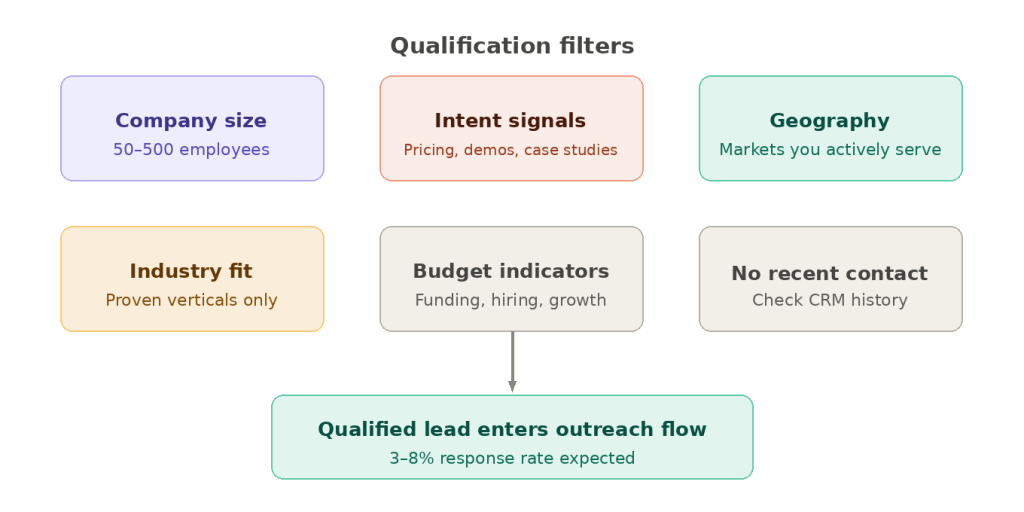
Establish clear filters for which companies make it into your outreach flow:
Company size: Set minimum and maximum employee thresholds based on your ideal customer profile. Many successful campaigns target companies with 50-500 employees.
Intent signals: Prioritize visitors who viewed high-intent pages like pricing, case studies, or product demos over those who only hit your blog.
Geographic relevance: Focus on markets where you actively sell and can provide support.
Industry fit: Filter for verticals where your solution has proven success.
Manual Review Process
Even with automated filtering, a quick manual review significantly improves campaign performance. This takes 10-15 minutes daily but can double your response rates.
During review, ask:
- Does this company actually need our solution?
- Are they in our target market geographically?
- Do they have budget indicators (recent funding, growth, job postings)?
- Have we contacted them recently through other campaigns?
Creating Automated Outreach Flows
The power of website visitor data lies in automation. Here’s how to build a system that runs continuously:
Data Flow Setup
- Website visitor tool captures and identifies companies
- Spreadsheet or CRM receives qualified company data
- Enrichment tool (like Clay) finds contact information automatically
- Outreach platform executes email sequences
- CRM tracks responses and opportunities
Campaign Messaging Strategy
Your messaging should acknowledge the visitor’s interest without being creepy. Effective cold email from website visitors follows this structure:
Subject lines: Keep them simple and relevant
- “Quick question about [Company Name]”
- “Following up on your [specific page] visit”
Opening: Reference their visit subtly
- “I noticed someone from [Company] was looking at our [solution area]”
- “Your team recently checked out our [specific resource]”
Value proposition: Focus on solving their likely problem, not your features
Call to action: Make it easy to respond with a simple question or offer
Timing and Follow-up
Strike while the iron is hot. Reach out within 24-48 hours of their website visit when your company is still fresh in their mind.
Plan a 3-5 email sequence over 2-3 weeks:
- Email 1: Initial outreach (day 1)
- Email 2: Additional value/case study (day 4)
- Email 3: Different angle/question (day 8)
- Email 4: Final follow-up (day 15)
FAQ
Most tools can identify 15-25% of your B2B traffic at the company level. Person-level identification is much lower, especially in Europe due to GDPR restrictions. The key is focusing on the quality of identified companies rather than total volume.
Well-executed campaigns typically see 3-8% response rates, which is 2-3x higher than traditional cold outreach. The intent signal makes a significant difference in engagement.
Implement cooling-off periods. If someone from a company doesn’t respond to your initial sequence, wait 3-4 months before contacting them again through any channel. This prevents message fatigue and maintains your brand reputation.
Focus on pricing pages, product demos, case studies, and feature comparisons. Blog traffic generally shows lower intent unless it’s very specific to your solution’s use cases.
Yes, but adjust your approach. Enterprise visitors often research extensively before engaging. Create longer nurture sequences and consider LinkedIn outreach alongside email for senior stakeholders.
Conclusion
Website visitor tracking transforms your existing web traffic into a consistent source of qualified leads. By identifying interested companies and reaching out with relevant, timely messaging, you can capture opportunities that would otherwise disappear forever.
The key to success lies in the qualification process—manually reviewing and filtering ensures your outreach feels relevant rather than spammy. Combined with automated workflows, this approach creates a scalable system for turning intent signals into sales conversations.
Ready to stop letting qualified prospects slip away unnoticed? Start by implementing visitor identification on your website and building your first automated outreach flow.