

Clay has revolutionized B2B data enrichment, but there’s a catch: credits can disappear faster than you’d expect. One poorly structured workflow can burn through thousands of credits while delivering the same results a well-optimized sequence could achieve for a fraction of the cost.
The good news? Most Clay workflows are running far from optimal efficiency. With the right approach to provider sequencing, action mapping, and budget planning, you can often reduce credit consumption by 50-70% without sacrificing data quality.
This guide will show you exactly how to audit your current workflows, restructure your enrichment waterfalls, and implement cost controls that keep your B2B data enrichment both effective and economical.
Why Clay Workflows Become Expensive (And How to Spot the Warning Signs)
Clay credits cost accumulates through three main inefficiencies that most teams don’t realize they’re making.
The first culprit is premium provider overuse. Many teams default to high-cost enrichment sources like ZoomInfo or Apollo for every data point, when cheaper alternatives could handle 60-80% of their enrichment needs. When you’re paying 15 credits for a ZoomInfo lookup that a 2-credit provider could have resolved, those costs compound quickly across large prospect lists.
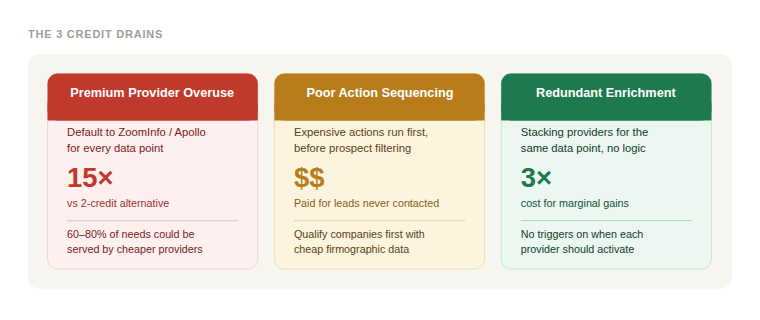
Poor action sequencing creates the second major drain. If your workflow runs expensive actions early in the waterfall—before filtering out irrelevant prospects—you’re essentially paying premium prices to enrich leads you’ll never contact. A common mistake is running full contact enrichment on every company in a broad search, rather than qualifying companies first with cheaper firmographic data.
The third issue is redundant enrichment steps. Teams often stack multiple providers for the same data type without clear logic about when each should trigger. Running three different email finders on every prospect, regardless of whether the first two succeeded, can triple your costs for marginal quality improvements.
Warning signs your workflow needs optimization:
- Credit burn rate exceeding $0.50 per qualified prospect
- Multiple high-cost providers targeting the same data points
- Enrichment actions triggering before prospect qualification
- Monthly credit consumption growing faster than prospect volume
The Workflow Audit: Mapping Actions to ROI
Before optimizing anything, you need visibility into where your credits are actually going. Clay workflow optimization starts with a systematic audit that maps each action to its cost and output value.
Start with credit tracking per action. Export your workflow history and calculate the average credit cost for each enrichment step. You’ll often discover that 20% of your actions consume 80% of your credits—classic Pareto principle in action.
Create a simple tracking sheet with these columns:
- Action name/provider
- Average credits per execution
- Success rate percentage
- Data quality score (1-10)
- Business impact (high/medium/low)
Evaluate data quality versus cost trade-offs. Not all enrichment providers deliver equal value. A premium email finder might have 95% accuracy versus 85% for a cheaper alternative—but is that 10% improvement worth 5x the cost? Often the answer is no, especially for top-of-funnel prospecting where volume matters more than perfection.
Identify redundancy opportunities. Look for workflow branches where multiple providers target the same outcome. If you’re running three different LinkedIn scrapers sequentially, test whether the first two alone maintain acceptable data coverage.
The audit should reveal your “expensive but essential” actions versus “expensive and replaceable” ones. Focus optimization efforts on the latter category first, where you can achieve significant cost reductions without impacting prospect quality.
Provider Sequencing: The Waterfall Strategy That Cuts Costs
The sequence of your enrichment providers directly impacts your Clay credits cost. The key is building a logical waterfall that exhausts cheaper options before escalating to premium sources.
Structure your waterfall by cost efficiency, not provider reputation. Start each enrichment category with the most cost-effective provider that can handle your basic needs. For example, if you need work emails, begin with a 2-credit provider that succeeds 70% of the time, then escalate to a 8-credit provider only for the remaining 30%.
Example cost-optimized email enrichment sequence:
- Clearbit (2 credits) – handles common domains well
- Hunter.io (3 credits) – fills gaps with pattern-based matching
- ZoomInfo (8 credits) – premium fallback for difficult prospects
- Manual research (15 credits) – last resort for high-value targets
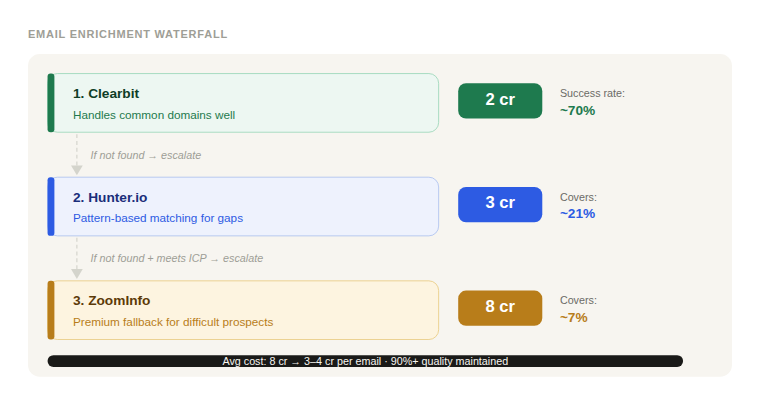
This waterfall approach can reduce average cost per email from 8 credits to 3-4 credits while maintaining 90%+ of your data quality.
Use conditional logic to prevent unnecessary escalation. Set up your workflow so expensive providers only trigger when cheaper ones fail AND the prospect meets specific qualification criteria. There’s no point spending 15 credits to find the email of someone at a 10-person company outside your ICP, regardless of data availability.
Batch similar actions together. Instead of running enrichment providers individually for each prospect, batch similar lookups together where possible. Some providers offer volume discounts or more efficient API usage when processing multiple records simultaneously.
The goal is creating a workflow that naturally finds the most cost-effective path to your required data quality threshold, rather than defaulting to premium providers for every lookup.
Setting Credit Budgets and Quality Benchmarks
Effective B2B data enrichment requires balancing cost control with output quality. The solution is setting target budgets that force strategic thinking about which enrichment steps actually drive results.
Calculate your target cost per qualified prospect. Work backward from your campaign economics. If you need 100 qualified prospects for a campaign and have a 2,000-credit budget, that’s 20 credits maximum per qualified prospect. This constraint forces you to prioritize enrichment actions that directly impact reply rates or qualification accuracy.
Establish quality thresholds for each data type. Not every field needs 99% accuracy. Email addresses require high accuracy since bounces hurt deliverability, but company size estimates or job titles can tolerate more variance. Define minimum acceptable quality levels:
- Work emails: 95%+ accuracy
- Company revenue: 80%+ accuracy (broad ranges acceptable)
- Job titles: 75%+ accuracy (role-level precision sufficient)
- Phone numbers: 90%+ accuracy (if used for outreach)
Implement staged budget releases. Instead of running full enrichment on entire prospect lists, process smaller batches first. Analyze the cost-per-qualified-prospect from your initial 100-200 prospects, then adjust your workflow before processing the remaining list. This prevents budget overruns and allows real-time optimization.
Track enrichment ROI by campaign outcome. Connect your Clay data to downstream metrics like email reply rates, meeting conversion, and deal progression. You might discover that prospects enriched with 5 credits convert just as well as those enriched with 20 credits—valuable insight for future campaigns.
Budget constraints aren’t limitations; they’re forcing functions that push you toward more efficient workflows and better targeting decisions.
FAQ
For most B2B data enrichment workflows, aim for 15-25 credits per qualified prospect. Well-optimized workflows often achieve 10-15 credits per prospect, while unoptimized ones can exceed 40 credits. Your target depends on prospect complexity and data requirements.
For email enrichment, Clearbit and Hunter.io typically provide strong cost efficiency for initial attempts. For company data, built-in Clay sources often outperform premium alternatives for basic firmographics. Always test multiple providers with your specific ICP before committing to expensive options.
Only when the incremental improvement justifies the additional cost. Running two email finders might increase success rate from 75% to 85%, but if that costs 3x more credits, it’s usually not worthwhile for top-of-funnel prospecting. Reserve multiple providers for high-value prospect segments.
Review workflows monthly for credit efficiency and quarterly for provider performance. Clay frequently adds new data sources and updates pricing, so what was optimal six months ago might not be today. Track your cost-per-prospect trends to identify when re-optimization is needed.
Clay doesn’t offer built-in spending caps, but you can create workflow logic that stops enrichment after reaching credit thresholds. Use conditional statements to pause workflows when cumulative credits exceed your budget, then manually review before continuing.
Conclusion
Optimizing your Clay workflow optimization isn’t about cutting corners—it’s about smart resource allocation that maximizes data quality while controlling costs. By auditing your current actions, restructuring provider sequences, and implementing budget controls, most teams can reduce their Clay credits cost by 50% or more without sacrificing prospect quality.
The key is treating credit optimization as an ongoing process, not a one-time fix. As your ICP evolves and new providers enter the market, regularly reassess your workflows to ensure you’re getting maximum value from every credit spent.
Ready to optimize your Clay workflows and reduce enrichment costs? Start with a workflow audit to identify your biggest cost drains, then implement the waterfall strategy for your most expensive enrichment categories. Your budget—and your results—will thank you.