

Sales leaders often hesitate when they hear about LinkedIn automation tools requiring access to team member profiles. The concern is understandable — handing over someone’s LinkedIn account feels like giving away the keys to their professional identity. But here’s what most don’t realize: managed LinkedIn outreach doesn’t mean surrendering control.
Modern LinkedIn automation platforms like HeyReach have solved this problem through smart operational design. You can run campaigns at scale using a team member’s profile while maintaining strict boundaries around privacy, brand safety, and message quality.
This guide explains exactly how managed LinkedIn outreach works, who should handle what responsibilities, and how to set up your campaigns without the typical risks that worry sales leaders.
How Managed LinkedIn Outreach Actually Works
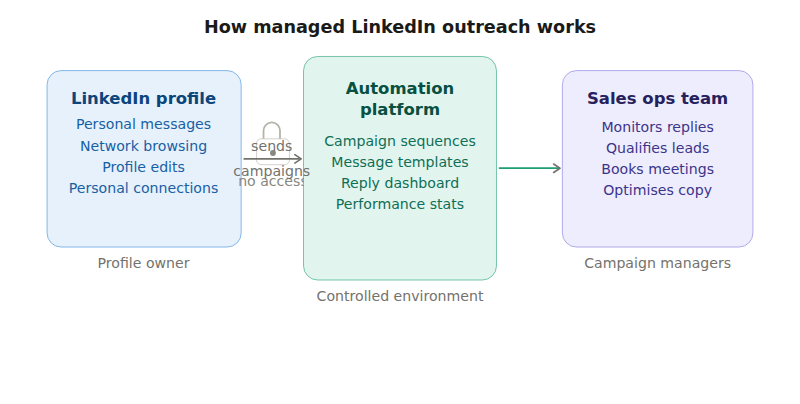
The biggest misconception about LinkedIn automation is that it requires handing over full account access. In reality, tools like HeyReach create a controlled environment where campaigns operate separately from personal LinkedIn activity.
When a team member connects their LinkedIn profile to an automation platform, the tool only gains access to send messages through designated campaigns. All existing conversations, personal connections, and private messages remain completely invisible to campaign managers. The platform creates a walled garden where only campaign-related interactions are visible to the team running outreach.
This separation means your sales operations team can manage responses and optimize messaging without ever seeing personal LinkedIn activity. They’ll view campaign conversations in a centralized dashboard, but won’t have access to browse the profile owner’s network, read their personal messages, or modify their profile information.
The technical setup is straightforward. The profile owner logs into the automation platform and connects their LinkedIn account through a secure authentication process — similar to how you’d connect your Google account to a new app. Once connected, campaign managers can design sequences and monitor responses without needing the person’s LinkedIn login credentials.
Key Operational Benefits
Centralized Response Management: All campaign replies flow into a single dashboard where your sales team can respond quickly and consistently.
Campaign Performance Tracking: Monitor connection acceptance rates, message open rates, and response rates across different message sequences.
Brand Protection: Message templates are pre-approved and automated, reducing the risk of off-brand communication from individual team members.
Choosing the Right Profile for LinkedIn Outreach
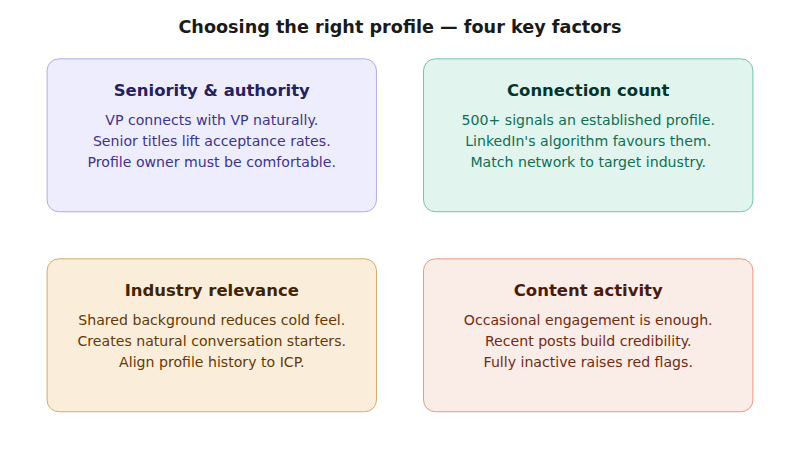
Not all LinkedIn profiles are created equal for outbound campaigns. The profile you choose significantly impacts connection acceptance rates and overall campaign performance.
Seniority and Authority Matter
Senior team members typically see higher acceptance rates because their titles carry more weight with prospects. A VP of Sales connecting with another VP of Sales feels more natural than an entry-level SDR reaching out to C-suite executives.
However, seniority shouldn’t be your only consideration. The profile owner needs to be comfortable with their account being used for outreach and should understand they’ll be the face of your campaigns.
Connection Count and Network Quality
Profiles with 500+ connections generally perform better than newer accounts. LinkedIn’s algorithm favors established profiles, and prospects are more likely to accept requests from people who appear well-connected in their industry.
Look for profiles with connections across your target industries and company sizes. A profile connected to many startup founders will perform better when targeting other startup leaders than someone whose network consists mainly of enterprise executives.
Industry Relevance and Content Activity
Choose someone whose background aligns with your target audience. A profile owner who has worked in your prospects’ industries or roles creates natural conversation starters and reduces the “cold” feeling of initial outreach.
The profile doesn’t need daily posting activity, but some engagement helps. Look for someone who occasionally comments on industry posts, shares relevant content, or has recent professional updates. A completely inactive profile raises red flags with prospects.
Technical Considerations
LinkedIn Premium accounts can send more connection requests per week and access additional features, though it’s not mandatory for successful campaigns.
Profile completeness matters more than premium status. Ensure the chosen profile has a professional photo, detailed work history, and industry-relevant skills listed.
Separating Message Sending from Response Management
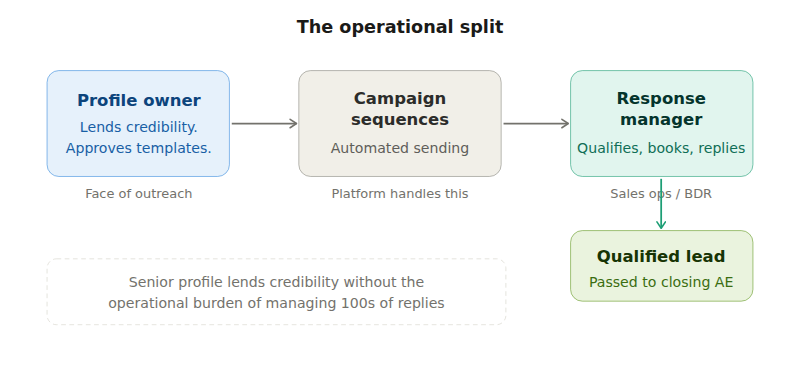
One of the smartest aspects of modern LinkedIn automation is the ability to separate who sends messages from who manages replies. This operational division creates efficiency while maintaining quality control.
The Operational Split
Profile Owner Role: Provides account access and remains the face of outreach campaigns. They don’t need to manage day-to-day responses unless they want to stay involved.
Response Management Role: A dedicated team member (often from sales ops or business development) monitors incoming replies, qualifies leads, and schedules meetings.
This separation allows your most senior team member to lend their credibility to outreach while freeing them from the operational burden of managing hundreds of prospect conversations.
Response Management Best Practices
Quick Response Times: Prospects expect fast replies on LinkedIn. Aim to respond within 2-4 hours during business days.
Consistent Voice: Train your response manager to match the profile owner’s communication style and maintain brand consistency.
Qualification Framework: Establish clear criteria for what constitutes a qualified lead before passing prospects to your sales team.
Escalation Process: Create guidelines for when complex questions or high-value prospects should be escalated to the profile owner or senior sales staff.
Managing Multiple Campaigns
Advanced LinkedIn automation platforms allow you to run multiple campaigns from the same profile while keeping conversations organized. You might have separate sequences for:
- Different target industries
- Various prospect seniorities
- Product-specific messaging
- Geographic regions
Each campaign can have its own message templates and response workflows while using the same profile for sending.
Maintaining Privacy and Brand Safety
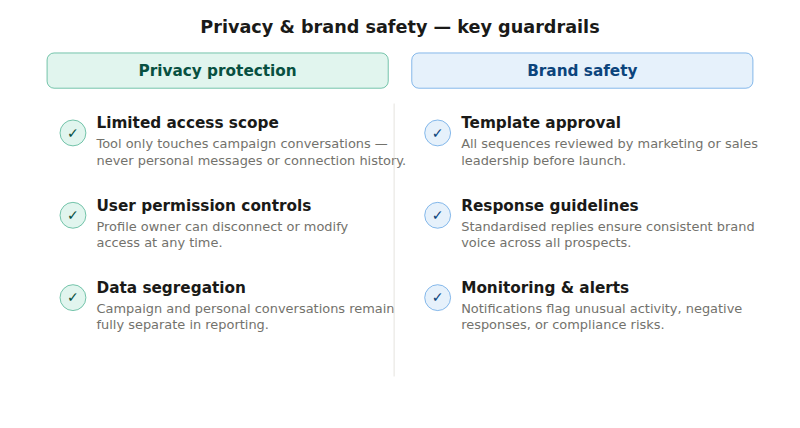
LinkedIn automation requires careful attention to privacy boundaries and brand protection. The key is setting up proper guardrails from day one.
Privacy Protection Measures
Limited Access Scope: Automation tools should only access campaign-related data, never personal messages or connection browsing history.
User Permission Controls: The profile owner retains the ability to disconnect their account or modify permissions at any time.
Data Segregation: Campaign conversations remain separate from personal LinkedIn activity in both the automation platform and reporting.
Brand Safety Protocols
Message Template Approval: All outreach sequences should be reviewed and approved by marketing or sales leadership before launching.
Response Guidelines: Create standardized responses for common scenarios to ensure consistent brand voice across all prospect interactions.
Monitoring and Alerts: Set up notifications for unusual activity, negative responses, or potential compliance issues.
Compliance Considerations
LinkedIn Terms of Service: Ensure your automation practices comply with LinkedIn’s current terms and usage limits.
Data Protection: If operating in regulated industries or regions (GDPR, etc.), verify that your automation platform meets necessary compliance standards.
Industry Regulations: Some industries have specific rules about prospecting communications that apply to LinkedIn outreach.
FAQ
Yes, absolutely. The profile owner can continue using LinkedIn for personal networking, posting content, and regular business activities. The automation platform only manages designated campaign conversations and doesn’t interfere with normal LinkedIn usage.
Negative responses are handled by your response management team according to pre-established protocols. Most platforms allow you to automatically remove prospects who request no further contact, and your team can escalate serious issues to leadership if needed.
LinkedIn imposes weekly limits that vary based on account age, premium status, and activity patterns. Most established profiles can safely send 80-100 connection requests per week, though these limits change periodically based on LinkedIn’s policies.
This is why it’s important to choose stable team members for outreach profiles. If the profile owner leaves, you’ll need to transition campaigns to a different team member’s profile. Most automation platforms make this transition relatively smooth, though you may experience a brief pause in outreach while switching accounts.
Yes, many B2B companies run coordinated email and LinkedIn outreach to the same prospect lists. The key is ensuring your messaging is complementary rather than repetitive, and that both channels feed into the same lead management system for proper tracking.
Conclusion
LinkedIn outreach automation doesn’t have to mean losing control over your team’s professional profiles or brand messaging. Modern platforms like HeyReach have solved the privacy and control issues that initially made sales leaders hesitant about LinkedIn automation.
The key is understanding how these managed systems work: they create controlled environments where campaigns operate separately from personal LinkedIn activity, allow operational teams to manage responses efficiently, and maintain strict boundaries around data access.
Ready to scale your LinkedIn outreach without the typical risks? Focus on choosing the right profile, setting up proper operational divisions, and establishing clear brand safety protocols from the start.